
Type "best POS software in India" into a search box, and you will get lists with a different "number one" every time. Most of those lists are written by the companies that sell the software, or by people who earn a commission from a click. So let us be honest from the start: there is no single best POS software for every shop in India.
What exists is a best fit for your shop, and you can find it with a clear method. This guide gives you that method. We also explain where our own POS software fits, and where it does not, because an honest answer helps you more than a sales pitch.
Why "best" depends on your shop
Consider three owners, all in India, all looking for POS software this month. These are illustrative examples.
- A pharmacy owner in Kochi needs batch numbers, expiry alerts and very quick billing at peak hours.
- A garment shop owner in Surat needs sizes and colours, exchanges, and a view of both counters from his phone.
- A wholesaler in Delhi's Sadar Bazaar needs big quantities, A4 GST invoices with the buyer's GSTIN, and trader accounts.
A product that is perfect for one of them may be poor for another. That is why one "best" list cannot be right for everybody.
What every Indian retailer should demand
Whatever your shop, these points should be on your list.
- Correct GST. Per-item rates, HSN codes, the CGST/SGST/IGST split, tax invoices and bills of supply, and clean reports for your accountant.
- Offline billing. Power cuts and weak internet are a fact of life. Billing must continue, and sync later without duplicates.
- UPI and split payments. Most customers pay by UPI, and many mix cash with UPI. Closing reports must show each mode separately.
- Support for how you sell. Loose items, sizes, batches, serial numbers, weighing-scale labels, whichever applies.
- Normal hardware. Standard barcode scanners and thermal printers from the market, not only the vendor's own.
- Staff control. PINs, discount limits and a record of who did what.
- Clear pricing and data export. You should know what you will pay, and be able to leave with your data.
The main kinds of products you will meet
| Type | Good at | Watch out for |
|---|---|---|
| Accounting-first billing tools | Ledgers, purchases, returns for the accountant | Counter billing can feel slow; may not suit a busy retail rush |
| Cloud retail POS | Fast counter billing, stock, remote view, automatic updates | Check offline mode and how data can be exported |
| Restaurant POS | Tables, kitchen orders, KOT | Not designed for retail items, sizes or batches |
| Mobile billing apps | Very low cost, quick start on a phone | Limits on stock, staff control and multiple counters |
| Large ERP systems | Big chains with many departments | Costly and heavy for a single shop |
Many shops use a mix: a retail POS at the counter, and the accountant's own software for books. Good products let you export your sales and tax data to your accountant in Excel.
How to pick a winner in four steps
Step 1: Choose two or three, not ten
More choices only create confusion. Pick the products that mention your kind of shop and your kind of problem. Ask friends who run similar shops what they use, and ask them what they dislike about it. A neighbour's honest complaint is worth more than ten review pages.
Step 2: Use the same test for each
Add 20 of your real items, bill five customers, switch off the Wi-Fi and bill two more, do a return, give a discount above a cashier's limit, close the shift and open the report. We list the steps in How to Choose the Best POS Software for Your Retail Store.
Step 3: Compare the full cost for three years
Include setup, support, extra users, upgrades and hardware. Our cost guide shows how to do it, with an example.
Step 4: Let your cashier vote
The person who will use it eight hours a day should be part of the decision. If your cashier says, "This is easy," that is a better sign than a list of features.
Also ask about India-specific things
- Can it give me the data my accountant needs for GST returns, in Excel?
- If my turnover grows, will it help with e-invoicing or e-way bills? (Rules and limits change, so also confirm current rules with your CA.)
- Does it show amounts in the Indian format, such as ₹1,25,000?
- Can it print on 2-inch and 3-inch thermal rolls, and send bills on WhatsApp?
- Is there support in my working hours, including evenings and Sundays?
Where AvenuePOS fits, and where it does not
We built AvenuePOS for retail shops in India, and we are happy to say what it is good at.
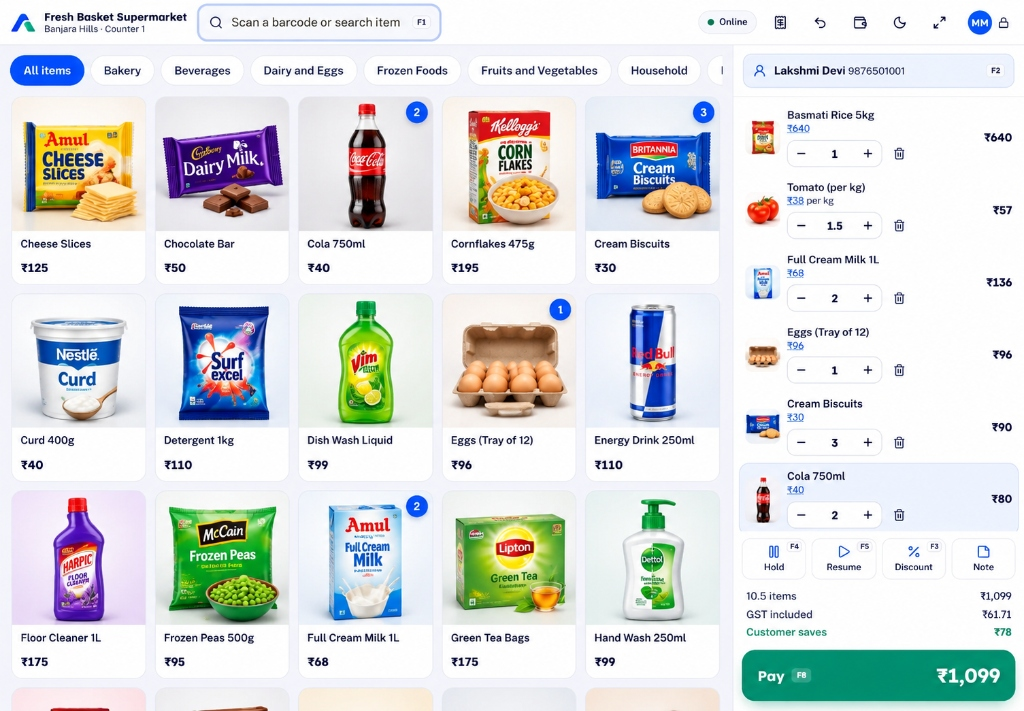
- Billing by scan, search or tapping a picture, with hold and resume
- GST tax invoices and bills of supply, with HSN and the tax split
- Offline billing that syncs without duplicates
- Stock per store, with low-stock alerts and Excel import
- PIN-based staff control and discount limits, with an activity log
- Owner dashboard on a phone or laptop
It suits grocery, pharmacy, clothing, hardware, stationery, wholesale, electronics and general stores. We have pages for each, for example POS software for wholesale shops and POS software for electronics shops.
It is not built for full-service restaurants with table orders and a kitchen display. If that is you, choose a restaurant POS. It also does not replace your accountant's full books. It sends clean sales and tax data to them.
The plans are simple: Starter at ₹499 a month, Growth at ₹999 and Pro at ₹1,999, with a 14-day free trial and no card. See the pricing page for what each includes.
What our customers say, and an honest note
Ten shops in Pune, Hyderabad, Jaipur, Bengaluru and Kochi have shared their experience with us, and all ten rated us 5 out of 5. Kundanoor Medical Stores in Kochi said, "Avenue POS makes our daily store operations easier. The billing process is convenient, and maintaining sales details is much more organised." We are proud of this, but we also know that ten shops is a small number, and your shop is different. That is why we keep saying: run the trial yourself.
The bottom line
The best POS software in India is not a ranking, it is a match. Decide what your shop needs, shortlist a few products, test them on a real day with your own items, compare the full cost, and choose the one that your cashier likes. If AvenuePOS makes your shortlist, we would be glad to be tested.