
POS software for stationery and book shops.
AvenuePOS is POS software for stationery and book shops. Bill notebooks, pens, school books and art supplies quickly. Keep stock of every book and item, and give school buyers a proper bill when the new session starts.
Start free trialNo card needed. Set up in about 10 minutes.
What a stationery or book shop needs.
The school season is the busiest time of the year. Lists are long, and each book and notebook must be in stock.
School season, fast
Bill a whole school list in a few minutes. Search by book name, class or item.
Stock for each book
Count each book by class and subject. Get a message before the popular ones run out.
Notebooks and sizes
A4, A5 and different page counts are separate items, each with its own price and stock.
Right GST on each item
Notebooks and stationery 12%, books 0%. Each item keeps its own rate, and the bill shows the split.
Import from Excel
Upload your full list of books and items from Excel. Check the preview, fix any row, and you are ready.
Bills for schools
Print a bill with the school’s name and GSTIN for bulk orders from schools and offices.
How the checkout looks.
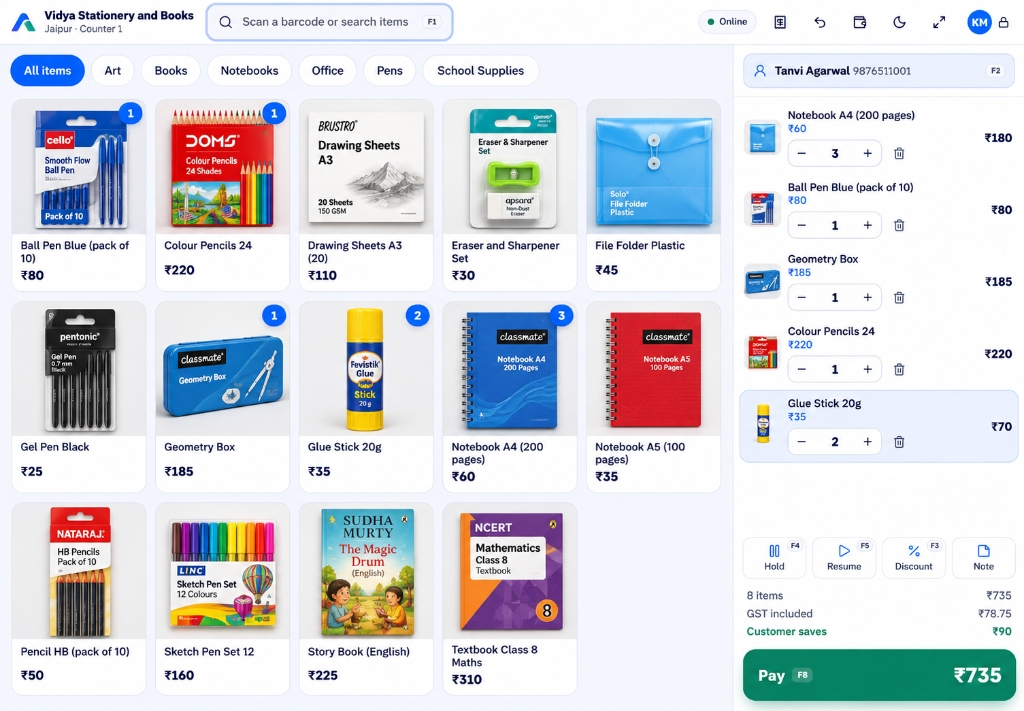
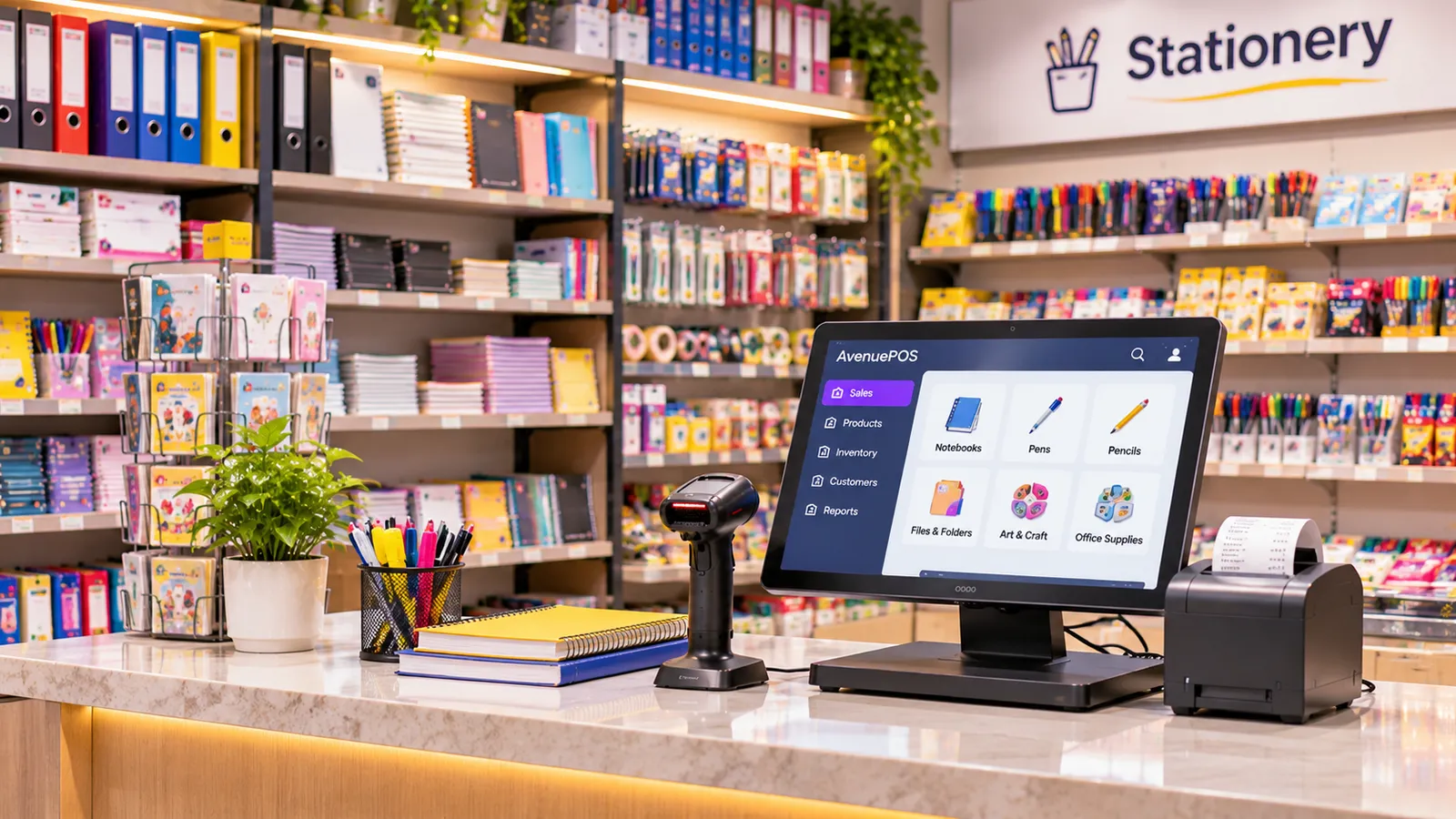
This is a demo shop in Jaipur with 14 items, and it shows how POS software for stationery and book shops works at the counter. These are real screens from the software.
Scan or search
Scan the barcode, or type the book or item name. It is added to the bill.
Add the customer
For a regular parent or school, find them by phone number.
Change the quantity
Set 3 notebooks or 1 geometry box. The total is updated.
See the tax and total
GST is shown for each item, so the buyer knows the tax on stationery and books.
Take payment
Cash, UPI or card. The bill is done only when it is fully paid.
A bill the customer can understand.
This is the bill from the screen above. It shows every item and the tax for each rate. Print it on a small printer, send it on WhatsApp, or print a full tax invoice.
- Every item with its quantity and price
- GST shown for each rate, as CGST and SGST
- Print it, send it on WhatsApp, or save it as a PDF
The owner’s view.
Check the shop from a laptop or a phone. See one store, or all the stores together.
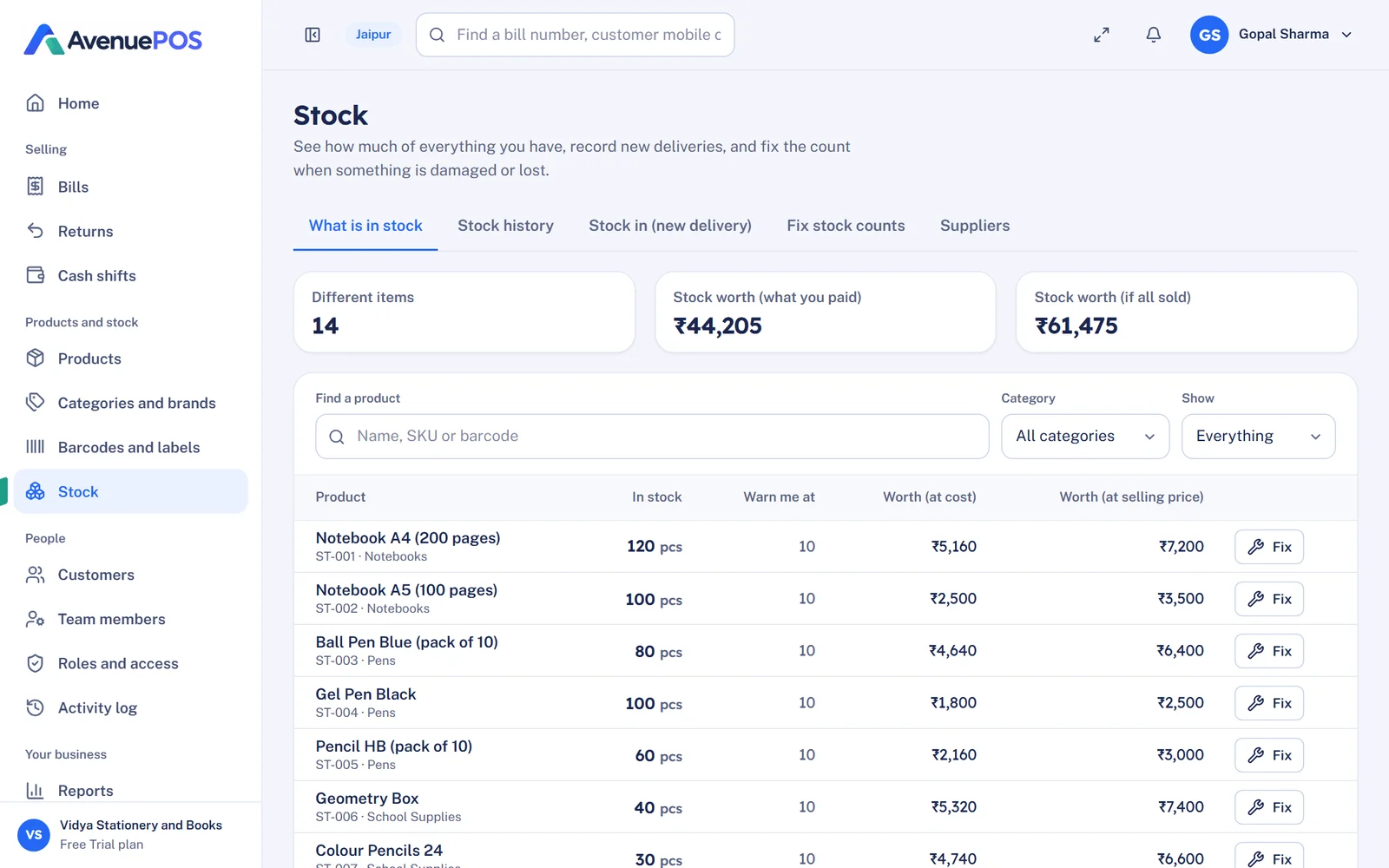
Stock for every item
See how much stock you have of each item, in each store. Record a delivery in one minute. Fix a wrong count with a reason, and the history stays saved.
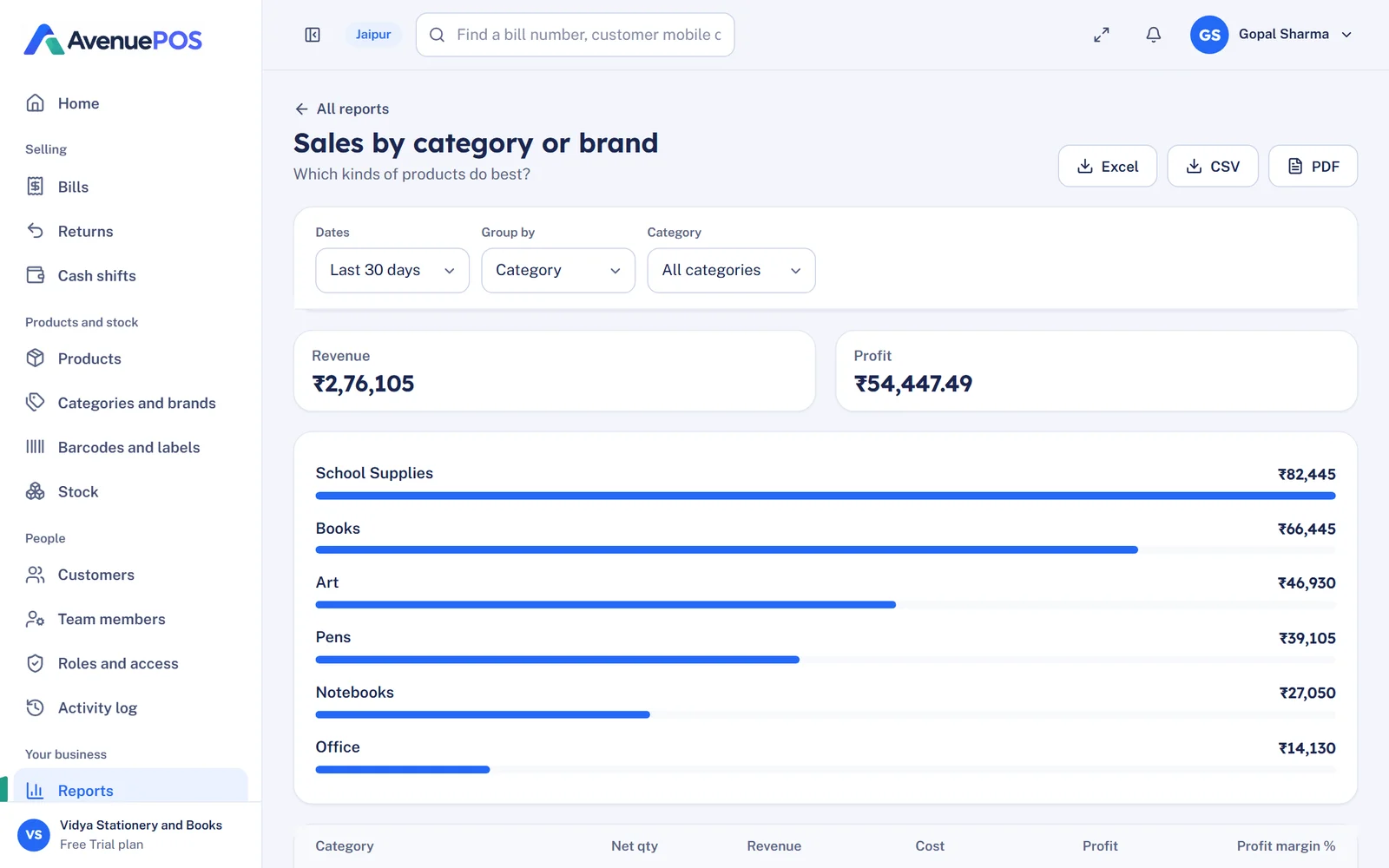
See what sells most
Sales and profit by department or category, for any week or month. Save any report to Excel or PDF.
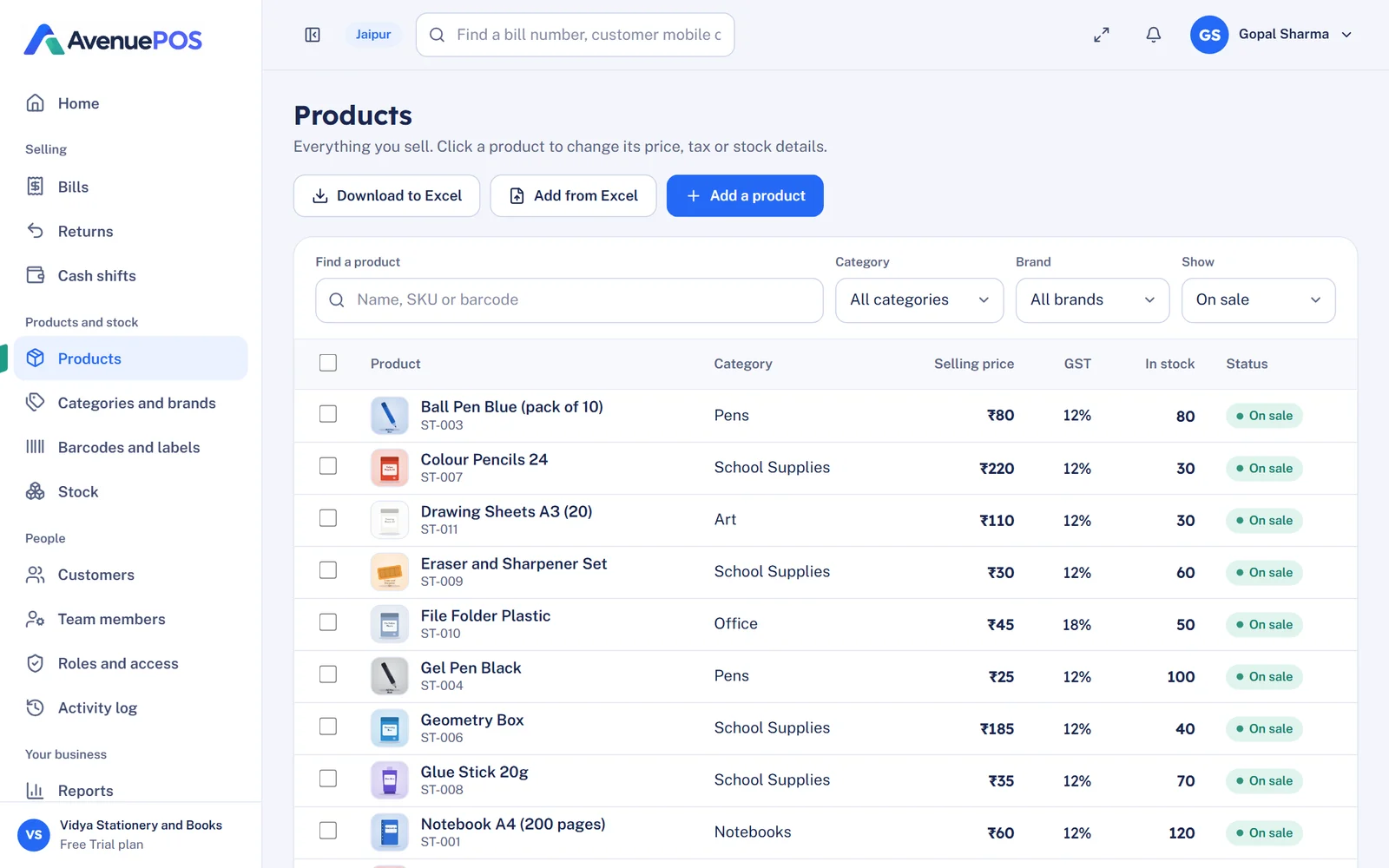
Keep your item list neat
Add pictures, barcodes, prices and tax for every item. Change a price once, and it changes at every counter.
A normal day in the shop.
- Start of day
Open the shift
The cashier logs in with a PIN and counts the cash in the drawer.
- Busy time
Scan, beep, next
Bill by barcode or name. Hold a bill if a customer goes back for more.
- Internet goes down
The shop keeps running
Items and prices stay on your computer, and bills still print and sync later.
- Stock arrives
Record the delivery
Enter what the supplier brought and the price you paid. Stock goes up at once.
- End of day
Close the shift
Count the cash, see any difference, and check the day’s sales and profit.
How it compares with a basic billing app.
A basic app bills one item at a time. A stationery shop bills whole school lists at once.
| What you need | A basic billing app | AvenuePOS |
|---|---|---|
| School lists | One item at a time | Whole list in a few minutes |
| Book stock by class | Not tracked | Counted for each book |
| Notebook sizes | One item for all sizes | Each size is its own item |
| Books and stationery GST | One rate only | Each item has its own rate |
| Catalogue | Typed one by one | Imported from Excel |
| School bills | Typed by hand | Printed with school name and GSTIN |
Check any software against this list.
- Quick billing of school lists
- Stock for each book
- Notebook sizes as separate items
- GST on each item
- Import from Excel
- School and office bills with GSTIN
- Works when the internet is down
- Reports you can save to Excel
From one shop to many branches.
Start with one counter. Add more counters and branches as you grow, without changing software. Plans start at $6 a month (₹499 in India).
Stock for each branch
Each branch has its own stock and low-stock list. Compare them side by side.
Each manager sees only their branch
Give a manager access to their own branches only. Every action is saved in the activity log.
Good for small and big shops
A small shop can start on the Growth plan. A big chain can move to Pro for more branches and counters.
Use it from anywhere
Open it in a browser on any computer, tablet or phone. Nothing to install.
Made for Indian shops.
Each item has its own GST rate and HSN code. Bills show CGST and SGST, or IGST for a sale to another state. You can print a tax invoice with the customer’s GSTIN.
UPI, cash and cards all work at the counter. You only need a computer, tablet or phone with Chrome or Edge.
POS software for other kinds of shops.
Stationery and book shops are one of 36 kinds of shops AvenuePOS is set up for.
Questions stationery and book shop owners ask.
Still unsure? Write to hello@avenuepos.com and a person will reply.
It is a billing system for shops that sell books, notebooks, pens and art supplies. It bills whole school lists, tracks stock for each book and gives a correct GST bill.
Yes. Search each book or item by name, and add it to the same bill. A long school list can be billed in a few minutes.
Pick one that handles school lists, stock per book, notebook sizes, GST on each item and Excel imports. You can try AvenuePOS free for 14 days.
Yes. Your items, prices and staff stay on the counter computer. Bills keep printing, and they are sent when the internet returns, one time only.
Plans start at $6 a month, or ₹499 a month in India. Every plan has billing, offline mode, tax invoices and reports. There is a 14-day free trial, with no card needed.
Yes. Each item has its own GST rate. The bill shows CGST and SGST, or IGST for a sale to another state, and you can print a tax invoice for a business customer.
Try it with your own shop.
Free for 14 days. No card needed.